/page/2

FIshtank: Process Note


Messing around with Maya since 2011, I constantly forget what I did to my files. Although I do take notes when I watch tutorials, I don’t keep any record of the development process. Hence I am regularly blocked by problems encountered before and have to redo the research. So to help me remember, I’m posting my process and WIP. I’m starting with my recent project “Fishtank.”

The fish vs. cat theme is a bit of a cliché that is already been represented by various artists many times. I decided to do my own take on it while working on my thesis film last year and  doodling while waiting for the render. I was especially fond of this goldfish character with a suspicious expression. So I kept and scanned this sketch before painting over it in Photoshop. Afterwards, I felt it might be fun to turn it into a 3D still because of its simple composition and seeming lack of complex elements.  However, I misjudged the complexity, and it ended up being the most complicated scene for me yet.

The very beginning stage of "fishtank"

I modeled the characters’ low-poly base meshes in Maya then imported them into Zbrush using “goZ”. The fish is really detailed compared to the cat, and although it may not have been necessary because it takes up less screen space than the cat, I had fun with the detailing. Every part of the fish is modeled separately then blended together using mia_roundcorners, so that I could have individual control of shading network. I referred to this inspiring tutorial by VFX artist Andre Hitsoy.

The main difference between goldfish and bass is its semi-opaque body. If you look at this WIP of the goldfish installation by Japanese artist Riusuke Fukahori, the artist intentionally dilutes the acrylic paint to create a “see-through” effect on the fish body. Luckily SSS shader can easily do the trick. On top of that I use a mia_material_x to control the specular and reflection, it works as the epidermis of the fish. Then I put a blinn with a ramp that’s controlled by the facing ratio node to give another layer of colorful reflection that almost looks like a soap bubble. Well it might not be accurate in the real life, but my fishy is cartoony so who cares… Here is the shading network for the goldfish body:

Shading network on fish's body

The most tricky part of the goldfish was probably its big cheeks. I looked online for reference for them and found that they should be mostly semi-opaque with low glossiness. The bottom of the cheek that connects to the face is blurry in the reference picture, but I can’t get the same look simply by lowering down the refraction glossiness of mia_material_x. I was stuck there for quite a while, and the final solution ended up being plugging a tinted parti_volume shader into the volume shader slot of its shading group. It’s not physically accurate because if the lighting condition changes, so you might want to change the color of the volume shader, but everything looks ok within the scene.

Reference fish vs. Look-dev fish

So after being done with my fishy, I moved to work on the cat. I originally want to do a short-hair cat like “Mittens” in Bolt, except a fatter version. The cat model is super low res and most of the detailed are controlled by the displacement map, which I now consider to be a huge mistake, having caused me endless problems during the process. The first mistake I realized is… my cat is too fat. When I put fur on it, it lost all of its silhouette and literally became a snowball. So I went back to Zbrush to help it lose some weight. The second issue I found out is that while Maya fur is UV based, I had used Zbrush generated PUV tiles on my entire model because I hate unfolding UVs. No matter how hard I tried, the cat’s fur look like a mosaic / collage, with all the fur is pointing in every which way. After several hours of research, I decided to move to Shave-and-a-Haircut , a super awesome plugin written by Joe Alter. And the result is awesome! I also used p_HairTK in Puppet’s shader_p package for shading. I am not a shave specialist nor a shading expert myself, so I have nothing special to talk about. Here are a list of articles I referred to a lot during the process:

The other tricky part is the fish tank with water in it. There are many nice water in glass tutorial online. Also in the Mental Ray Arch and Design documentation, there’s a chapter explaining how to cheat the geometry to achieve a physically accurate result. However, at the beginning I went through another tutorial which utilize MR dielectric material. Everything looks great at the beginning, except for the grainy effect on the edge of dielectric material that come from nowhere. Even after I bumped up the number of rays to a very high value, I still can’t get a pleasant result. Mia_material did a great job except for the very dark spot showing on the edge of the glass and the intersection between glass and water. I tried to fix that but can’t get a very nice result since the black is caused by the heavy refraction on the edge of the materials.

The paint-over of the final render

I used MR with caustic and AO active for rendering. I wanted to use FG but when on, it gives a spotty orange light on the cat’s face, which may be caused by the caustic photon bounced from the table. The entire scene was rendered in one pass with an added Z-Blur later in Nuke.

Other links:

I secretly hope Autodesk can take out the default “Quadratic” filter on the image file node (or I should learn Python asap…). And my greatest appreciation to all these smart and talented TDs and artists who share their works and experiences in the CG community.

Fishtank in the real world

Yinglei’s Demo Reel (last update: 05-01-13)

Yinglei’s Resume: Download PDF

Yinglei’s Art Portfolio: View Online or Download PDF


Breakdown:

  • 00:06 - FISH TANK - Personal project - Maya, Zbrush, Mental Ray, Shave

  • 00:28 - REUNION - Personal project - Maya, Nuke, Zbrush, Mental Ray, Photoshop

  • 00:55 - SK ENERGY DRINK - Commercial - Maya, Illustrator
    I modeled the energy drink bottle and put the label texture on it.

  • 01:07 - ENVIRONMENT DESIGN - Photoshop

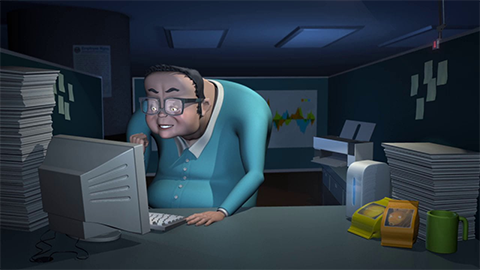
  • 01:16 - THE ALL-NIGHTER - Personal project - Maya, Photoshop, After Effects
    Won “Best Story” at 2012 UCLA Animation Prom

More environment stuff

More environment stuff

An organic environment

An organic environment

A futuristic city concept based on a previous matte painting for my friend.

A futuristic city concept based on a previous matte painting for my friend.

Once upon a time in somewhere…

Once upon a time in somewhere…

Color thumbnails: random locations

B&W environment thumbnails: Alien terrain

Big cheek goldfish WIP.
“Paopao” (泡泡) is his name.

Another wedding commission… for my cousin.
Recently I’ve been trying hard to capture light onto canvas. Here’s the result.

A commission for my friend’s wedding.

A commission for my friend’s wedding.

Screenshots from my thesis film “Reunion” that I finished at UCLA.
Tools: Maya, Zbrush, Nuke and Photoshop

The film could be seen here:

password: yinglei

Reunion - Thesis film from Yinglei on Vimeo.

Thesis Project Concept: A red balloon in the bombed city

“Way Home” - Remind me of the days in Shanghai
Digital painting exercise based on found photograph.

“Way Home” - Remind me of the days in Shanghai
Digital painting exercise based on found photograph.

Finished my second film at UCLA Animation Workshop! It won the “Best Story” of animation Prom this year.
I learnt so much about animation as well as other technical stuff this year]. Thanks to my composer who urge me to revise my story. And congratulation to my classmates getting the best of show again this year! Heading for thesis now!

If you are interested, the film could be seen here:

password: yinglei

The All-nighter soundmix first draft from Yinglei on Vimeo.

About:

by Yinglei Yang
Animator and director based in Los Angeles.
For more information, please see Yinglei's résumé